
Needs a check
One room is cooling quickly.
17°F drop in 2½ hours
In this simulation, the room cools from 62°F to 45°F over 2½ hours.
Outside: 14°F. Nearby rooms remain warm.
Next stepCheck Room 204’s windows and heating.

Terrestream for Facilities
Even when campus is empty. Holiday closures. Sudden cold snaps. An open window in an empty room. Bring room conditions and outdoor weather into one prioritized campus view, so your team knows where to go and what to check first.
HECVAT & accessibility documentation availableNeeds a check
17°F drop in 2½ hours
In this simulation, the room cools from 62°F to 45°F over 2½ hours.
Outside: 14°F. Nearby rooms remain warm.
Next stepCheck Room 204’s windows and heating.
Aerodyne Inc. has worked with more than 50 universities across the United States. Aerodyne reports the following results from one heating season on a Midwestern campus that stayed mostly empty over the holidays.
Year over year, reported by Aerodyne as measured by the university.
Rooms checked from the dashboard instead of on foot.
Five buildings. One heating season. No hubs or gateways to install.
With campus nearly empty, staff reached a room as its temperature approached freezing.
These owner-reported results describe one campus and one heating season in Aerodyne’s facilities work. A detailed baseline and measurement method are not published here; the figures have not been independently verified and do not establish savings for a new Terrestream installation. Savings and outcomes vary; similar results and loss prevention are not guaranteed.
Start with one building
Put coverage where your team needs it most. Five sensors, yours to keep, with 12 months of monitoring included.
The checks that matter
Choose a concern to see the signal, the rooms it can affect and the first check to make.
Room temperature is falling while outdoor conditions are below freezing.
Check heat delivery and exposed plumbing in the affected room.
Buildings connect to monitored rooms and the inspection priorities described below.
Room temperature is falling while outdoor conditions are below freezing.
First check. Check heat delivery and exposed plumbing in the affected room.
One room cools rapidly toward outdoor temperature while nearby rooms stay stable.
First check. Inspect windows, exterior doors and drafts; confirm the cause on site.
Rooms served by the same system fail to maintain their expected temperature range.
First check. Check the thermostat, local equipment and heating or cooling delivery.
Room conditions suggest unnecessary conditioning during scheduled unoccupied hours.
First check. Review operating schedules and temperature setbacks against actual room use.
Persistent high humidity or condensation risk calls for a moisture check.
First check. Inspect for damp surfaces and moisture sources; review ventilation and dehumidification.
CO₂ remains elevated during occupied periods.
First check. Review occupancy and outdoor-air delivery; check the ventilation system.
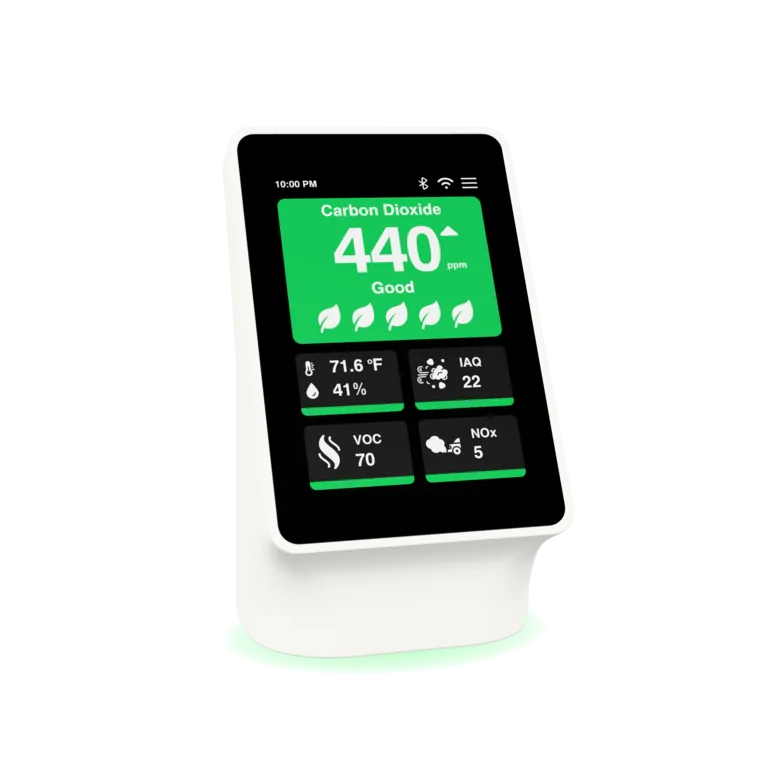
Simple to place. Useful all year.
Temperature and humidity reveal changing conditions. CO₂, particulate matter and gas indexes help your team investigate ventilation and air quality long after heating season ends.
Plug into continuous USB-C power and join approved campus Wi-Fi with the Terrestream app.
Choose its building and room. Prepare locations in the dashboard or add them as you install.
Your team shares one campus workspace, with room history and a record of checks and recovery.
Your campus, in numbers
$249 each · $199 at 11+
Use the budget for the areas you plan to cover.
Enter your own estimate to see a modeled return.
First 12 months of monitoring included. Then $49 per monitored sensor per year, billed annually.
Three-year view · USD
Compare the return using the same campus costs. Select a scenario or enter your own percentage above.
Illustrative outcomes depend on the changes your team makes in response to findings.
Operating benefitInvestment + fees
Results from other providers show what identifying waste and acting on it can achieve. They describe individual projects and operational changes.
Compliance & procurement
Scope your rooms. Get IT sign-off. Submit a purchase order or request NET 30 invoice review.
Completed HECVAT 4.1.6 and an Accessibility Conformance Report prepared using VPAT® are available on request.
Request compliance documentsAccessibility statementOur documentation maps information security controls to ISO/IEC 27001 and 27002 and SOC 2 control themes, and selected device capabilities to NISTIR 8259A, ETSI EN 303 645 and NIST CSF 2.0. These are documented alignments, not third-party certifications.
For facilities, IT, and procurement
It measures room conditions. Cooling patterns and outdoor conditions can suggest heat loss; a person checks the window, heating, and other possible causes.
No. Monitoring helps prioritize checks. Required inspections, heat protection, maintenance, and insurer requirements remain part of your program.
The room view shows missing or stale readings as unknown. Use a fallback check when reliable readings are unavailable.
Yes. Alerts are sent to a verified primary contact by email and text message. If no one acknowledges an urgent alert, a backup contact gets it after the delay you set. Alerts go out only during the coverage hours your team chooses, around the clock or on a weekly schedule; an alert raised outside those hours waits until coverage starts. Administrators can see delivery status, and each incident records who acknowledged it.
The Facilities workspace exports incidents and their activity log as CSV files. Optional local HTTP and MQTT access support your own network integrations. Discuss hosted API access and any building-management integration requirements when scoping your order.
Start with one building
Tell us about your buildings, rooms, and what your team wants to learn.
Search the knowledge base.